All posts by admin

A Candlestick Strategy With Soldiers And Crows

ndle reversal patterns—a bullish one white soldier and a bearish one black crow—that requ

The Expert Design Studio code for Jerry D’Ambrosio and Barbara Star’s article, “A Candlestick Strategy With Soldiers And Crows,” in Stocks & Commodities October 2018 issue is shown below.”Among the more well-known candlestick reversal patterns are soldiers and crows. These occur in a three-candle pattern such as three white soldiers or three black crows. Recently, on the website Candlesticker.com, we learned of two other candle reversal patterns—a bullish one white soldier and a bearish one black crow—that require fewer candles. ”

!A CANDLESTICK STRATEGY WITH SOLDIERS AND CROWS
!Author: Jerry D'Ambrosio & Barbara Star, TASC Oct 2017
!Coded by: Richard Denning 8/05/2017
!www.TradersEdgeSystems.com

!CODING ABBREVIATIONS:
O is [open].
O1 is valresult(O,1).
C is [close].
C1 is valresult(C,1).
C2 is valresult(C,2).
H is [high].
L is [low].
V is [volume].

!INPUTS:
minPriceBull is 1.
minPriceBear is 10.
minVolume is 1000. !in hundreds
volAvgLen is 50.
dayCount is 5.
longExitBars is 7.
shortExitBars is 1.

okToBuy if simpleavg(C,50) > simpleavg(C,200) or CminPriceBull and simpleavg(V,volAvgLen)>minVolume.
BullWS if C1C1 and C>O1 and O= longExitBars.

okToSell if simpleavg(C,50) < simpleavg(C,200) or C>simpleavg(C,200)*1.1.
okToSellMkt if TickerRule("SPX",okToSell).
PVfilterBear if C>minPriceBear and simpleavg(V,volAvgLen).
BearBC if C1>C2 and C1>O1 
     and OO1 
     and countof(C1>C2,dayCount)=dayCount
     and PVfilterBear and okToSellMkt.
ExitShort if {position days} >= shortExitBars.
I ran several backtests using the NASDAQ 100 list of stocks over the period from 8/04/2000 to 8/04/2017. I varied the following inputs to find the optimum set of parameters for the candlestick patterns. For longs, the “dayCount” = 5 with an “longExitBars” = 7 produced the best results, which is shown in Figure 5. For shorts, the “dayCount” = 5 with a “shortExitBars” = 1 produced the best results, which is shown in Figure 6. Neither commission nor slippage were subtracted from the results.

Sample Chart

FIGURE 5: WINWAY. EDS summary report for longs only.

Sample Chart

FIGURE 6: WINWAY. EDS summary report for shorts only.
—Richard Denning
info@TradersEdgeSystems.com
for TradingExpert Pro

ire fewer candles. “

Bitcoin May Rise Another 20-fold, But First….

First off, for the record I am an “Old Dog” and Bitcoin is a “New Trick”. That creates a problem right there.  The truth is also that can’t honestly say that I fully understand what Bitcoin actually is or how it actually works (which technically means I am in pretty good company with a lot of people who are actually trading it, but I digress).  And as a “grizzled veteran” (of the markets) there is a part of me that instinctively wants to dismissively shout “bubble” and sneeringly walk away.  It’s not like it hasn’t been seen before – tulip bulbs, the Nifty 50, silver, technology/dot.com stocks, interest only mortgages and so on.
Most of you know the drill:
*Some form of “investment” catches lightning in a bottle
*The investment world (for lack of a more professional phrase) “wet’s itself”
*Price soars beyond all rational levels
You know, sort of like what you see in Figure 1…
BitcoinFigure 1 – Bitcoin price (Bitcoin.com)
…And then it all ultimately plummets painfully to earth.
Well, at least temporarily. I mean sure tulip bubbles never ascended the heights again, but a lot of the Nifty 50 went on to still be major companies even after their stock cratered.  The same for a lot of the major dot.com era companies.  Silver is still trading as a serious commodity and real estate seems to have rebounded.
In sum: Is Bitcoin forming a price “bubble”? It’s hard to look at Figure 1 and not think so.  Of course, even if it is the questions no one can answer for sure are “When” and “from what level”?
The other question is “if it is a bubble and the bubble bursts, will crypto currencies go the way of tulip bulbs (as an investment) or is there a future for them in the long run?”
A Recent Bubble History Lesson
In the late 90’s into 2000 a bubble formed in tech stocks. And the bubble burst and it was ugly. And many “hot” companies folded and vanished. But not all of them and certainly not the major players.  And certainly not the industry as a whole.  Like I said before I don’t truly understand Bitcoin and crypto currencies. So I can’t say for sure if they are a “craze” – like tulip bulbs in the 1600’s during “Tulipmania” or something more viable and sustainable – like technology stocks.  To understand why this distinction matters, consider the stocks listed in Figure 2.aFigure 2 – Dot.com bubble stocks that survived and thrived
As you can see in Figure 2 through 7 each of these stocks experienced a “bubble” and a “crash”.  Interestingly, the companies themselves ultimately rebounded and thrived.
The average “crash” was -87% and the average post-crash advance (so far) is about 16,000%.aaplFigure 3 – Apple (Courtesy AIQ TradingExpert)
amznFigure 4 – Amazon (CourtesyAIQ  TradingExpert)
msftFigure 5 – Microsoft (Courtesy AIQ TradingExpert)
nvdaFigure 6 – Nvidia (Courtesy AIQ TradingExpert)
pclnFigure 7 – Priceline (Courtesy AIQ TradingExpert)
Summary
The only thing we can say for sure is that some people will make a great deal of money from Bitcoin/crypto currencies and others will likely get wiped out.  The danger is obvious: whenever you have a lot of investors “chasing” something – especially something that many of them don’t even understand – it is a recipe for trouble.
That being said, in my (market addled) mind the real “long-term” question is, will crypto currencies still be “a thing” after the bottom falls out?  If Bitcoin is a bubble, then if history is a guide we can look or a decline in price somewhere in the 80% to 99% range after the top is ultimately made.
From there, if history is also a guide then depending on whether or not crypto currencies prove to be a viable thing, we can expect them to either:
a) Vanish altogether
OR
b) Rise 15-20 fold from the bottom
So here is my Bitcoin/crypto currency investing guide:
*It is OK to pile in and buy Bitcoin in hopes of getting rich (as long as you do not “bet the ranch”, invest only a small portion of your capital and acknowledge that a 100% loss is absolutely a possibility and that you are willing and able to accept that risk).
*It is also OK to sneer and shout “bubble” and not invest.  But if and when the bottom drops out and prices crater remember to peruse the wreckage.  There just might be an opportunity there (remember, Priceline lost -99% when the dot.com bubble burst, then gained 32,000%).
In any event, hold on tight people, this is NOT going to be a smooth ride.
Jay Kaeppel Chief Market Analyst at JayOnTheMarkets.com and AIQ TradingExpert Pro client.
Disclaimer:  The data presented herein were obtained from various third-party sources.  While I believe the data to be reliable, no representation is made as to, and no responsibility, warranty or liability is accepted for the accuracy or completeness of such information.  The information, opinions and ideas expressed herein are for informational and educational purposes only and do not constitute and should not be construed as investment advice, an advertisement or offering of investment advisory services, or an offer to sell or a solicitation to buy any security.
A Bottom-Picking Portfolio

In a recent article I highlighted some stocks that appeared to have a chance of “putting in a low”.  In another article, I highlighted the potential usefulness of “horizontal lines” on a chart.  The phrase “putting in a low” is essentially a kindler, gentler version of the phrase “Hey, let’s pick a bottom”.
The reality is that the ability to “pick tops and/or bottoms” on any kind of a consistent basis is a skill that roughly 99.2% of all investors and traders do not possess.  That being said, there is such a thing as a legitimate “bottom formation” (at least in my market addled opinion).  A security that bounces several or more times off a particular price is sending information that the sellers may be running out of ammunition.  These levels can be observed by drawing horizontal trend lines across a price chart – connecting recent highs and/or lows at roughly similar prices.
“Loading up” in this situation is not recommended. But committing an acceptable percentage of one’s portfolio (a level which each investor must decide on their own) to such opportunities is a perfectly acceptable form of speculation.
So for arguments sake, below is a “Bottom Pickers Portfolio”.  As always, I am not recommending this as an investment, simply highlighting an alternative idea for your further consideration.
The Tickers
The tickers included in this portfolio are mostly all commodity related.  That is not a purposeful choice; they simply “fit the model”.
First is ticker BAL – an ETF that tracks the price of cotton futures.  The critical level for BAL is roughly the $43.50 area.
1Figure 1 – Ticker BAL (Courtesy AIQ TradingExpert)
Ticker GDX tracks a gold stock index and has been consolidating in a relatively tight range after last year’s sharp rally and subsequent pullback.
2Figure 2 – Ticker GDX (Courtesy AIQ TradingExpert)
Ticker JO tracks the price of coffee futures.  This is one of the weakest charts on the list and is dangerously close to failing to the downside.  However, if the low holds this will strengthen the outlook a great deal.
3Figure 3 – Ticker JO (Courtesy AIQ TradingExpert)
Ticker SGG tracks the price of sugar futures. SGG has been consolidating in a narrow range for about four months.  Key price levels on the downside are $26.50 and the August 2015 low of $24.79.
4Figure 4 – Ticker SGG (Courtesy AIQ TradingExpert)
Ticker SWN is Southwestern Energy Co.  After a long, devastating decline the stock is attempting to form a low in the $5 a share range.
5Figure 5 – Ticker SWN (Courtesy AIQ TradingExpert)
Ticker UNG tracks natural gas futures.  Thanks to the advent of fracking – which is made natural gas abundantly available – the price of natural gas has collapsed in recent years.  In the past week it retested its 2016 low and then ticked higher.  Like JO, this one is precariously close to “failing”.  But for now…
6Figure 6 – Ticker UNG (Courtesy AIQ TradingExpert)
The Bottom Pickers Portfolio                      
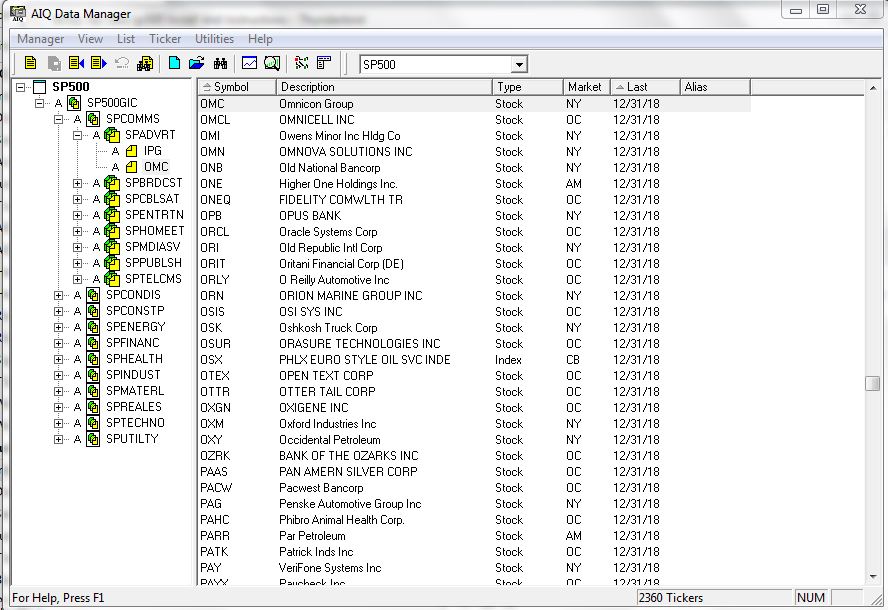
I use AIQ TradingExpert software to create my own “Groups”.  So I created one called “Lows” to include the six tickers above.  The group consists of an equal dollar investment in each ticker.  The chart for this combination of tickers appears in Figure 7.EDITORS NOTE: Creating your own groups is accomplished in the TradingExpert Data Manager information can be found in this article ‘Adding groups and sectors to your Group/Sector List’

7Figure 7 – The “Lows” Group (Courtesy AIQ TradingExpert)
Summary
Let me be blunt.  There is every chance that the majority of the tickers highlighted above will continue their long-term bearish trends and break down to the downside causing further losses for those holding these shares.
The primary thing to highlight in this piece is a personal preference.  I prefer “horizontal” lines on a chart – i.e., straight across, left to right – to the more typical slanted trend lines that most traders use.  The reason is simply – upward or downward slanting trend lines require a trader to decide which two (or more) highs (or lows) to connect in order to draw the trend line.  At the end of the day this is often a subjective decision.
Horizontal trend lines – which connect to (at least roughly equal) highs or lows – are generated by the market itself and as such, are more objective in nature.  In other words, investor buying and selling determines these levels.
Will my “Bottom Pickers Portfolio” move to the upside or fail to the downside?  We’ll just have to wait to find out.
Jay Kaeppel Chief Market Analyst at JayOnTheMarkets.com and AIQ TradingExpert Pro client.
Disclaimer:  The data presented herein were obtained from various third-party sources.  While I believe the data to be reliable, no representation is made as to, and no responsibility, warranty or liability is accepted for the accuracy or completeness of such information.  The information, opinions and ideas expressed herein are for informational and educational purposes only and do not constitute and should not be construed as investment advice, an advertisement or offering of investment advisory services, or an offer to sell or a solicitation to buy any security.
Adding groups and sectors to your Group/Sector List

Adding groups and sectors to your Group/Sector List

If for some reason you want to add to the Group/Sector List delivered with the system, TradingExpert Pro provides the necessary functions.

The procedure for adding to your Group/Sector List is as follows:

1. Add any new stocks to the Master Ticker List

2. Add new group tickers to the Master Ticker List.  

3. Add new sector tickers to the Master Ticker List.

4. Add new sectors to the Group/Sector List.  Under each new sector, insert the groups that will make up that sector.

5. Add new groups to the Group/Sector List.  Under each new group, insert the stocks that will make up that group.  

6. Use the Compute Group/Sector Indices function to compute indices for the new groups and sec­tors.

7. Use the Set RS Symbols function to set relative strength relationships.

Can a ticker be entered in more than one group?

TradingExpert Pro allows you to enter a ticker in more than one group.  For example, you may want to follow an index of locally-owned companies by placing them in a newly created group.  One of those companies could be a computer software development company that you would want to include in an industry group of computer stocks.  You can enter an eq­uity into as many user created groups as you want, but it is  important that you do not enter these user created groups into sectors.  Only principal industry groups should be collected into a sector.

Adding a new sector to your Group/Sector List

Proceed as follows:

1. First, add a new sector ticker to your Master Ticker List.  Click the Ticker command on the menu bar.  Then click New to display the New Ticker dialog box.  

2. Enter a ticker for the new sector, then be sure to enter the proper Type designation (sector).

3. Click OK, and the second dialog box for entering a new ticker appears.

4. Type in a name (Description) and the First Date of data.  The remaining default settings on this second dialog box can remain the same.

5. Click OK, and the new sector ticker will be added to the Master Ticker List.

6. Insert the new sector ticker into your Group/Sector List by doing the following:

Display the Group/Sector List in the left (List) window by choosing its name from the Selected List text box on the toolbar.

Highlight the new sector in the Master Ticker List by clicking on its name with your mouse.

Again using your mouse, click the name of the master sector in the List window.

Select the Insert Ticker(s) command on the List sub-menu or click the Insert to list toolbar button.

7. Before inserting groups under the new sector, be sure to create any new group tickers and add them to the Master Ticker List.

8. Insert all of the groups that will make up the new sector by doing the following:

Select in the Master Ticker List all of  the groups you want to add by simply holding down the Ctrl key while clicking each group.

Again using your mouse, click the new sector in the Group/Sector List under which you want to insert the groups.

Select the Insert Ticker(s) command on the List sub-menu or click the Insert to list toolbar button.

Adding a new group to your Group/Sector List

Follow these steps:

1. First, add a new group ticker to the Master Ticker List.  Click the Ticker command on the menu bar.  Then click New to display the New Ticker dialog box.  

2. Enter a ticker for the new group, then be sure to enter the proper Type designation (group).

3. Click OK, and the second dialog box for entering a new ticker appears.

4. Type in a name (Description) and the First Date of data.  The remaining default settings on this second dialog box can remain the same.

5. Click OK, and the new group ticker will be added to the Master Ticker List.

6. Insert the new group ticker into your Group/Sector List by doing the following:

Display the Group/Sector List in the left (List) window by choosing its name from the Selected List text box on the toolbar.

Highlight the new group in the Master Ticker List by clicking on it with your mouse.

Again using your mouse, click the sector in the List window under which you want to insert the new group.  If the list is fully contracted, you may need to use the Expand Level command on the List sub-menu to display all of the sectors.

Select the Insert Ticker(s) command on the List sub-menu or click the Insert to list toolbar button. 

7. Before inserting stocks under the new group, be sure to add any new stocks to your Master Ticker List.  

8. Insert stocks by doing the following:

Select in the Master Ticker List all of  the stocks you want to add by simply holding down the Ctrl key while clicking each stock.

Again using your mouse, click the new group in the Group/Sector List under which you want to insert the stocks.

Select the Insert Ticker(s) command on the List sub-menu or click the Insert to list toolbar button.

Computing indices for a new group or sector

Following your next data retrieval, the group and sector in­dices will be automatically computed.  However, when you add a new group or sector to your Group/Sector List, and you want to see an analysis at once without waiting for your next data retrieval, you can use the Compute Group/Sector Indices function to create the index.

To use Compute Group/Sector Indices:

1. Click Utilities on the Data Manager menu bar to display the drop-down menu.  

2. Select Compute Group/Sector Indices from this menu.  The Compute Group/Sector Indices dialog box appears.

3. In the Source section, click the option button for Selected Group(s) Symbols, then select your new group or sector in the text box.  Check to compute both Parent and Child symbols.

4. In the Range section, select the first option, Update from Last Date of Data.

5. Choose OK.  The computation will begin.

6. After you have computed group/sector indices, you should execute the function Set RS Indicators.

Setting relative strength relationships 

This function sets your relative strength indicators to conform with parent/child relationships.  Then, when you are working in Charts, you can easily see the relative strength of the stock vs. its parent group, a group vs. its parent sector, or a sector vs. the master sector.

To set Relative Strength Indicators:

1. Click Utilities on the Data Manager menu bar to display the drop-down menu.  

2. Select Set RS Symbols.  Then select Set RS Tickers.  The Set RS Tickers dialog box appears. 

3. Click the name of your list in the Selected Lists text box.

4. Click the first option, Set Relative Strength Relationships (overwrite).

5. Choose the OK button.

Building a new Group/Sector List

If for some reason you would want to build a new Group/Sector List, first create a new list and master sector, then follow the procedure above for adding groups and sectors to the list.

An Unusual 4 ETF Portfolio…That Seems to Work

I know I repeat it a lot but the purpose of this blog is not to offer recommendations but rather to share ideas.  So here is one that I am not quite sure about but am keeping an eye on.
The FourNonCorr Portfolio
Somewhere awhile back I started looking at trying to pair non correlated – or even inversely correlated – securities in a portfolio that had the potential to outperform the overall market. What follows is what I refer to as the FourNonCorr Portfolio.  For the record I do not trade this portfolio with real money.  I am still trying to figure out if there is something to it or not.  But given that it has outperformed the S&P 500 by a factor of 3-to-1 (granted, using hypothetical results) since December of 2007, I figure it might be worth monitoring for awhile.
The portfolio consists of four ETFs:
Ticker FXE – Guggenheim CurrencyShares Euro Trust
Ticker UUP – PowerShares DB US Dollar Index Bullish
Ticker TLT – iShares Barclays 20+ Yr Treas. Bond
Ticker XIV – VelocityShares Daily Inverse VIX ST ETN
The monthly charts for each appear in Figure 1.
1Figure 1 –The Four ETFs in The Four NonCorr Portfolio (Courtesy AIQ TradingExpert)
As you can see there is a lot of “zigging” by one accompanied by “zagging” for another.  No surprise that when the Euro rises the dollar falls and vice versa. Also, TLT often seems to move opposite XIV. That is essentially the purpose of these pairings.
Figure 2 displays the correlations between the four ETFs in the portfolio (using AIQ TradingExpert Matchmaker function from 8/31/2012 through 8/31/2017 using weekly data).  A reading of 1000 indicates a perfect correlation, a reading of -1000 indicates a perfectly inverse correlation.
FXE UUP TLT XIV
FXE (913) 77 (13)
UUP (913) (117) 43
TLT 77 (117) (234)
XIV (13) 43 (234)
Figure 2 – Correlations for the FourNonCorr Portfolio ETFs (Source: AIQ TradingExpert)
Clearly there is a whole lot of “not correlating much” going on.
Results
For testing purposes I used monthly total return data for each ETF from the PEP Database from Callan Associates.  The one exception is ticker XIV which did not start actual trading until December 2010.  For January 2008 through November 2010 I used index data for the index that ticker XIV tracks inversely (S&P 500 VIX SHORT-TERM FUTURES INDEX). Actual XIV ETF data is used starting in December 2010.
As a benchmark, I also tracked the cumulative total return for ticker SPY (that tracks the S&P 500 Index).
Figure 3 displays the cumulative percent gain or loss for both the FourNonCorr Portfolio and ticker SPY.3Figure 3 – Cumulative % gain/loss for The FourNonCorr Portfolio (blue) versus SPY (red); 12/31/2007-9/30/2017
Year-by-year results appear in Figure 4
4 NonCorr SPY Diff
2008 (6.0) (37.0) 31.0
2009 26.1 26.4 (0.3)
2010 45.2 14.9 30.3
2011 (1.3) 2.1 (3.4)
2012 34.3 15.8 18.5
2013 19.3 32.2 (12.9)
2014 5.3 13.5 (8.2)
2015 0.6 1.3 (0.8)
2016 21.0 11.8 9.2
2017* 24.4 14.1 10.2
Figure 4 – Year-by-Year Results
The results by the numbers appear in Figure 5.
4NonCorr SPY
Average 12mo % +/- 17.8 11.2
Median 12mo % +/- 14.9 15.0
Std. Deviation 17.1 16.8
Ave/Std. Dev. 1.04 0.67
Worst 12mo % (11.9) (43.2)
Max. Drawdown % (17.8) (48.4)
Figure 5 – By the numbers
All told The FourNonCorr Portfolio:
*Gained +334% versus +110% for SPY since 12/31/2007
*Experienced a maximum drawdown of -17.8% versus-48.4% for SPY
Thoughts
On paper, The FourNonCorr Portfolio looks pretty decent, particularly compared to the S&P 500 Index.  But you will recall that I stated earlier that I don’t actually trade this portfolio with real money.  Why not?  A few concerns:
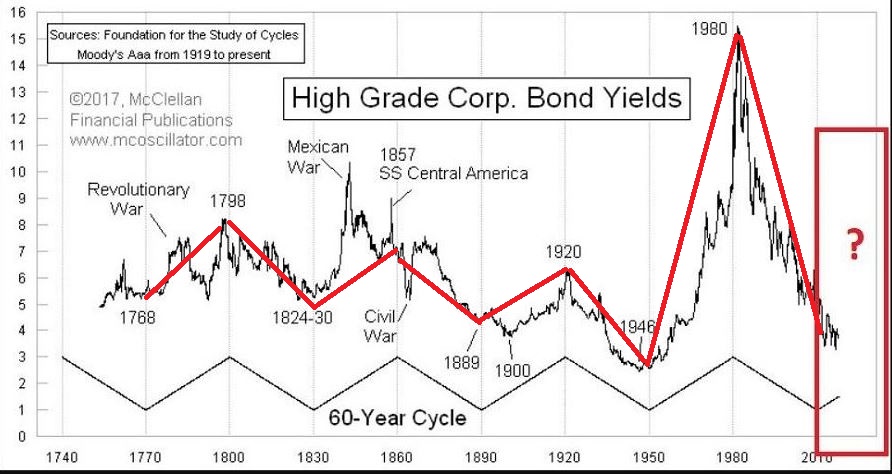
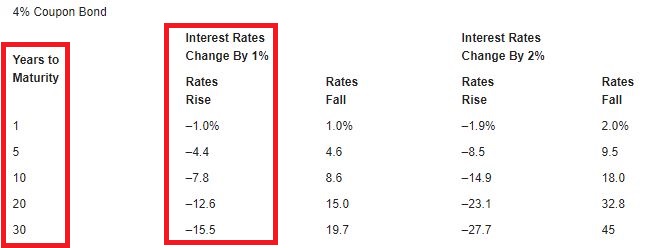
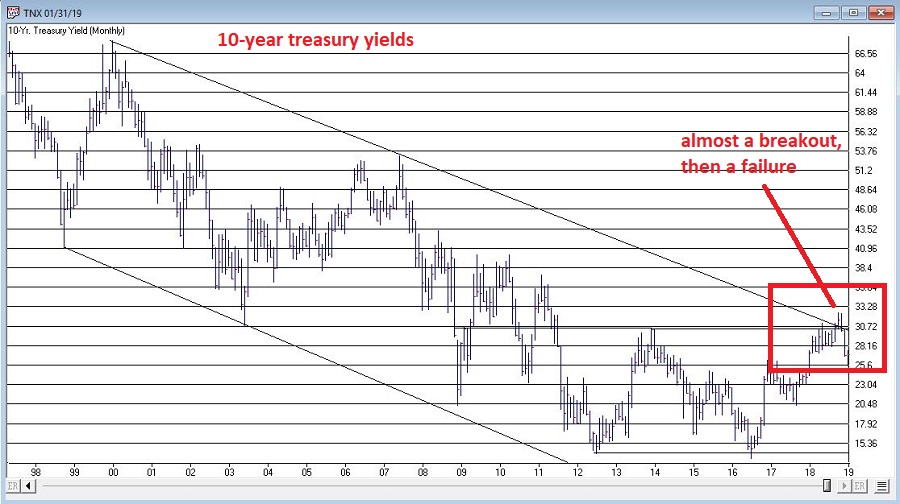
*Interest rates tend to move in long-term waves up and down.  How beneficial will it be to have TLT in the portfolio if and when interest rates embark on a long-term wave up?
*I don’t entirely trust ticker XIV.  Because of the way it is built it seems to have the benefit of upward bias due to contango in the VIX futures market (the opposite of ticker VXX – please Google “VXX” and/or “contango” for an actual explanation) it also holds the potential to sell off in shocking fashion.  Using the index data as I did in order to replicate hypothetical performance from Jan 2008 through Nov 2010, XIV declined a stunning -72% between the end of May 2008 and the end of November 2008. It also experienced a -60% decline in 2015-2016. Need to give some thought to adding a security that is even capable of that to a permanent portfolio.
*On the flip side, XIV has been the driving force for gains in recent years and shows a cumulative gain of +416% since 12/31/2007.  If (and when?) we ever do see a bear market and/or a significant pickup in volatility will XIV have a large negative influence on performance?  That seems to be the $64,000 question.
Summary
As a thought experiment, The FourNonCorr Portfolio shows a pretty decent track record and seems to hold some interesting promise.  As a real money, real world experience – questions remain.
Stay tuned, tinker and experiment if you wish,and don’t be too quick to “dive in.”
Jay Kaeppel Chief Market Analyst at JayOnTheMarkets.com and AIQ TradingExpert Pro client.
Disclaimer:  The data presented herein were obtained from various third-party sources.  Whilne I believe the data to be reliable, no representation is made as to, and no responsibility, warranty or liability is accepted for the accuracy or completeness of such information.  The information, opinions and ideas expressed herein are for informational and educational purposes only and do not constitute and should not be construed as investment advice, an advertisement or offering of investment advisory services, or an offer to sell or a solicitation to buy any security.