Category Archives: EDS

A Candlestick Strategy With Soldiers And Crows

ndle reversal patterns—a bullish one white soldier and a bearish one black crow—that requ

The Expert Design Studio code for Jerry D’Ambrosio and Barbara Star’s article, “A Candlestick Strategy With Soldiers And Crows,” in Stocks & Commodities October 2018 issue is shown below.”Among the more well-known candlestick reversal patterns are soldiers and crows. These occur in a three-candle pattern such as three white soldiers or three black crows. Recently, on the website Candlesticker.com, we learned of two other candle reversal patterns—a bullish one white soldier and a bearish one black crow—that require fewer candles. ”

!A CANDLESTICK STRATEGY WITH SOLDIERS AND CROWS
!Author: Jerry D'Ambrosio & Barbara Star, TASC Oct 2017
!Coded by: Richard Denning 8/05/2017
!www.TradersEdgeSystems.com

!CODING ABBREVIATIONS:
O is [open].
O1 is valresult(O,1).
C is [close].
C1 is valresult(C,1).
C2 is valresult(C,2).
H is [high].
L is [low].
V is [volume].

!INPUTS:
minPriceBull is 1.
minPriceBear is 10.
minVolume is 1000. !in hundreds
volAvgLen is 50.
dayCount is 5.
longExitBars is 7.
shortExitBars is 1.

okToBuy if simpleavg(C,50) > simpleavg(C,200) or CminPriceBull and simpleavg(V,volAvgLen)>minVolume.
BullWS if C1C1 and C>O1 and O= longExitBars.

okToSell if simpleavg(C,50) < simpleavg(C,200) or C>simpleavg(C,200)*1.1.
okToSellMkt if TickerRule("SPX",okToSell).
PVfilterBear if C>minPriceBear and simpleavg(V,volAvgLen).
BearBC if C1>C2 and C1>O1 
     and OO1 
     and countof(C1>C2,dayCount)=dayCount
     and PVfilterBear and okToSellMkt.
ExitShort if {position days} >= shortExitBars.
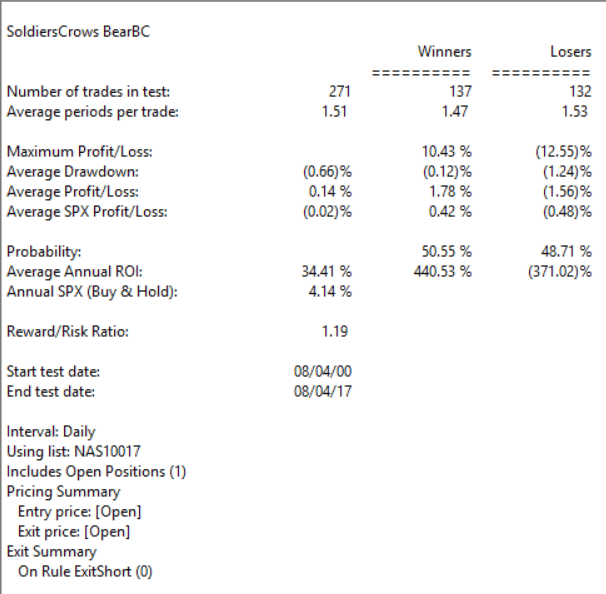
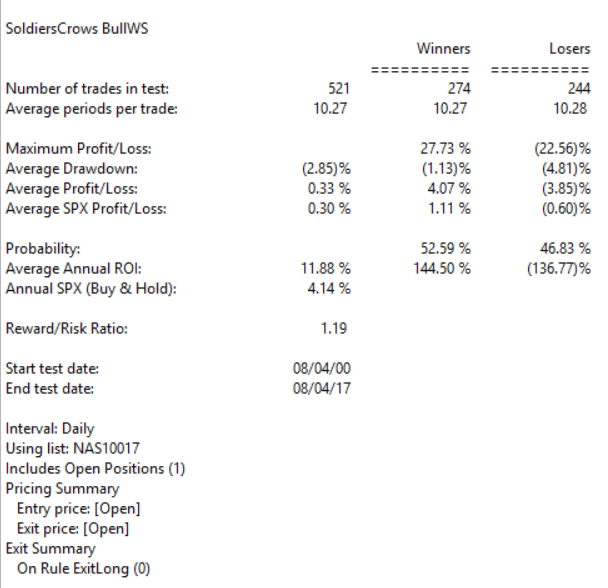
I ran several backtests using the NASDAQ 100 list of stocks over the period from 8/04/2000 to 8/04/2017. I varied the following inputs to find the optimum set of parameters for the candlestick patterns. For longs, the “dayCount” = 5 with an “longExitBars” = 7 produced the best results, which is shown in Figure 5. For shorts, the “dayCount” = 5 with a “shortExitBars” = 1 produced the best results, which is shown in Figure 6. Neither commission nor slippage were subtracted from the results.

Sample Chart

FIGURE 5: WINWAY. EDS summary report for longs only.

Sample Chart

FIGURE 6: WINWAY. EDS summary report for shorts only.
—Richard Denning
info@TradersEdgeSystems.com
for TradingExpert Pro

ire fewer candles. “

System Development Using Artificial Intelligence

The AIQ code based on Domenico D’Errico and Giovanni Trombetta’s article in August 2017 Stock & Commodities issue, “System Development Using Artificial Intelligence,” is shown here. You can also download the EDS file from here

Are humans or computers better at trading? This question has been around on many fronts since the era of punch cards, and as technology advances, you question whether machines have limits. It’s the same with trading, and here’s an algorithm that may shed some light on which performs better…

!ARTIFICAL INTELLIGENCE FOR SYSTEM DEVELOPMENT
!Authors: Domenico D'Errico & Giovanni Trombetta, TASC August 2017
!Coded by: Richard Denning, 6/08/2017
!www.TradersEdgeSystems.com

!INPUTS:
O is [open].
C is [close].
H is [high].
L is [low].
exitBars is 8.
exitBarsP is 6.
enterGap is -0.08.

!CODE:
AvgP is (O+C+H+L)/4.
MedP is (H+L)/2.
MedB is (O+C)/2.

AvgP1 is valresult(AvgP,1).
AvgP2 is valresult(AvgP,2).
AvgP3 is valresult(AvgP,3).

MedP1 is valresult(MedP,1).
MedP2 is valresult(MedP,2).
MedP3 is valresult(MedP,3).
MedP4 is valresult(MedP,4).

MedB1 is valresult(MedB,1).
MedB2 is valresult(MedB,2).
MedB3 is valresult(MedB,3).
MedB4 is valresult(MedB,4).

!ENTRY & EXIT RULESl
Gandalf if 
  (AvgP1exitBars-1)
 or ({position days}>=exitBars-1)
 or ({position days}>=exitBarsP-1 and (C-{position entry price}>0)).

EntryPr is min(val([low],1) + enterGap,[open]).

Buy if Gandalf and [low] <= EntryPr.

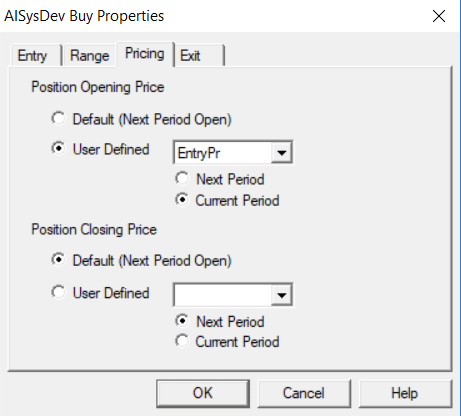
See Figure 10 for how to set up the pricing in a backtest.
Sample Chart

FIGURE 10: AIQ. This shows the EDS backtest settings for entry pricing.
—Richard Denning
info@TradersEdgeSystems.com
for AIQ Systems

A Simple Indicator for Traders

First the Bad News: There are no “magic bullets” when it comes to trading.  There are people in this industry who have literally tested somewhere in the range of six bazillion “indicators” – give or take (“Hi. My name is Jay”).  Every trend following indicator looks like a gold mine when it latches onto a huge trend and rides it (but not so much when it starts getting whipsawed).  And every overbought/oversold indicator looks like a gift from heaven from time to time when it somehow manages to peak (or valley) and then reverses right at a high (or low).  And then the next time the thing gets oversold the security in question just keeps plunging and the previously “amazingly accurate” indicator just gets more and more oversold.

Bottom line: what I am about to discuss is likely no better or worse than a lot of other indicators.  And it is no holy grail.  Still, I kinda like it – or whatever that is worth.

EDITORS NOTE an AIQ EDS file for this indicator with the 3 step rules outlined can be downloaded from here you will need to copy or save this file into your wintes32/eds strategies folder. Alternatively the code is available at the end of this article for copying and pasting into a new EDS file.

UpDays20

I call this indicator UpDays20 and I stole, er, learned it originally from Tom McClellan of McLellan Financial Publications.  My calculation may be slightly different because I wanted an indicator that can go both positive and negative.  For a given security look at its trading gains and losses over the latest 20 trading days.

UPDays20 = (Total # of Up days over the last 20 trading days) – 10

So if 10 of the last 20 trading days showed a gain then UpDays20 would read exactly 0.

If only 6 of the last 20 trading days showed a gain then UpDays20 would read -4

You get the idea (and proving once again that it “doesn’t have to be rocket science”).  As a “trading method” it is always advised that this indicator – like most all other indicators – NOT be used as a standalone approach to trading.  That being said, the way I follow this indicator is as follows.

Step 1) UpDays20 drops to at least -2

Step 2) UpDays20 rises 2 points from a low

Step 3) The security in question then rises above its high for the previous 2 trading days

It is preferable to follow this setup hen the security in question is above its 200-day moving average, but that is up to the trader to decide (the danger to using this with a security below its 200-day moving average is that it might just be in the middle of a freefall.  The upside is that counter trend rallies can be fast and furious – even if sometimes short-lived).

Again, there is nothing magic about these particular steps.  They are simply designed to do the following:

1) Identify an oversold condition

2) Wait for some of the selling pressure to abate

3) Wait for the security to show some sign of reversing to the upside

Like just about every other indicator/method, sometimes it is uncannily accurate and sometimes it is embarrassingly wrong (hence the reason experienced traders understand that capital allocation and risk management are far more important than the actually method you use to enter trades).

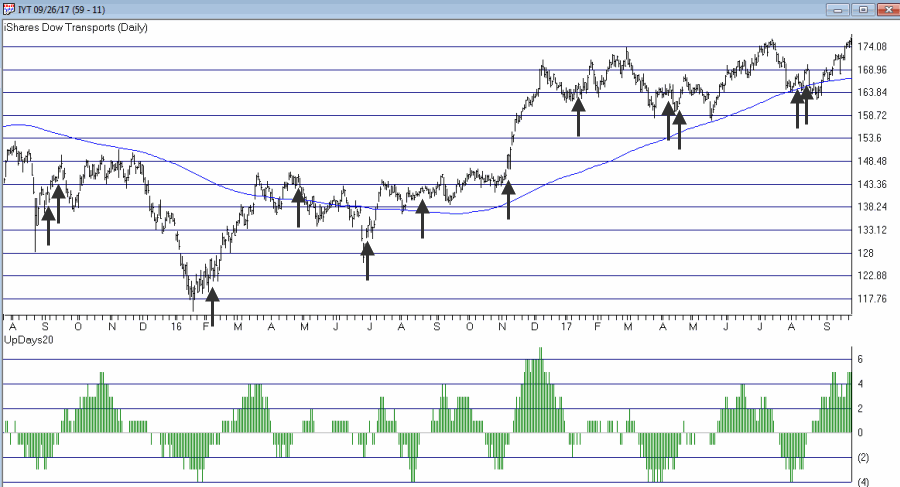
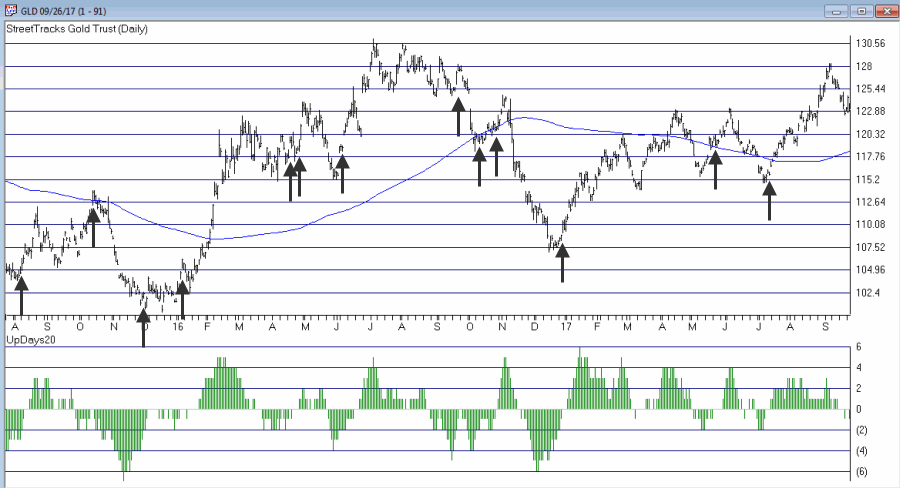
In this previous article (in Figures 3 and 4) I wrote about using this indicator with ticker TLT.  Figure 1 and 2 display the “buy” signals generated using the rules above for tickers IYT and GLD.

1Figure 1 – UpDays20 “Buy” Alerts for ticker IYT (Courtesy AIQ TradingExpert)

2Figure 2 – UpDays20 “Buy” Alerts for ticker GLD (Courtesy AIQ TradingExpert)

Are these signals good or bad?  That is in the eye of the beholder and not for me to say.  One big unanswered question is “when do you exit”?  That is beyond the scope of this “idea” article – however, “sell some at the first good profit and then use a trailing stop” looks like a decent approach to consider) but would have a profound effect on any actual trading results.

Some of the signals displayed in Figures 1 and 2 are obviously great, others are maybe not so hot.  Interestingly, some of the signals in Figure 1 and 2 that don’t look to timely at first blush actually offered a profitable opportunity to a trader who was inclined to take a quick profit. Again, how you allocate capital and when you exit with a profit and when you exit with a loss would likely have as much impact on results as the raw “buy” signals themselves.

Summary

No one should go out and start trying to trade tomorrow based on UpDays20.  No claim is being made that the steps detailed herein will result in profits nor even that this is a good way to trade.

But, hey, it’s one way.

Jay Kaeppel Chief Market Analyst at JayOnTheMarkets.com and AIQ TradingExpert Pro client.

Disclaimer:  The data presented herein were obtained from various third-party sources.  While I believe the data to be reliable, no representation is made as to, and no responsibility, warranty or liability is accepted for the accuracy or completeness of such information.  The information, opinions and ideas expressed herein are for informational and educational purposes only and do not constitute and should not be construed as investment advice, an advertisement or offering of investment advisory services, or an offer to sell or a solicitation to buy any security.

EDITORS NOTE an AIQ EDS file for this indicator with the 3 step rules outlined can be downloaded from here you will need to copy or save this file into your wintes32/eds strategies folder. Alternatively the code is available at the end of this article for copying and pasting into a new EDS file.

! UpDays20 – I call this indicator UpDays20. For a given security look at its trading gains and losses over the latest 20 trading days.

! UPDays20 = (Total # of Up days over the last 20 trading days) – 10

! So if 10 of the last 20 trading days showed a gain then UpDays20 would read exactly 0.

! If only 6 of the last 20 trading days showed a gain then UpDays20 would read -4

Upday if [close]&gt;val([close],1).

totalupdayslast20days is CountOf(upday,20).

updayindicator is totalupdayslast20days – 10.

! How to follow this indicator

! Step 1) UpDays20 drops to at least -2

! Step 2) UpDays20 rises 2 points from a low

! Step 3) The security in question then rises above its high for the previous 2 trading days

UpDays20rises2points if updayindicator&gt;valresult(updayindicator,1) and valresult(updayindicator,1)&gt;valresult(updayindicator,2).

updays20atminus2orlower if valresult(updayindicator,2)&lt;=-2.

closesabovehighof2priordays if [close]&gt;val([high],1) and [close]&gt;val([high],2).

Upsignal if UpDays20rises2points and updays20atminus2orlower and closesabovehighof2priordays.
Detecting Swings

The AIQ code based on Domenico D’Errico’s article in the May 2017 issue of Stocks & Commodities issue, “Detecting Swings,” is provided here.

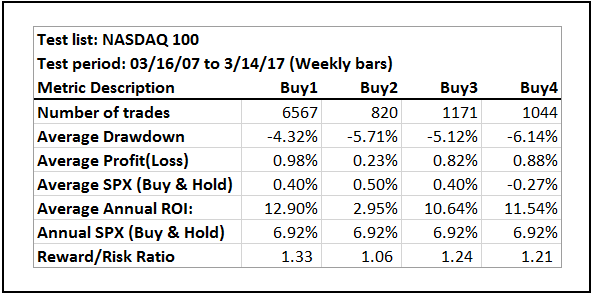
I tested the author’s four systems using the NASDAQ 100 list of stocks on weekly bars, as did the author, from 3/16/2005 through 3/14/2017. Figure 7 shows the comparative metrics of the four systems using the four-week exit. The results were quite different than the author’s, probably due to a different test portfolio and also a 10-year test period rather than the author’s 20-year period. In addition, my test results show longs only, whereas the author’s results are the average of both the longs and shorts.

Sample Chart

FIGURE 7: AIQ. As coded in EDS, this shows the metrics for the author’s four systems run on NASDAQ 100 stocks (weekly bar data) over the period 3/16/2005 to 3/14/2007.

The Bollinger Band (Buy2) system showed the worst results, whereas the author’s results showed the Bollinger Band system as the best. The pivot system (Buy1) showed the best results, whereas the author’s results showed the pivot system as the worst. I am not showing here the comparative test results for the Sell1 thru Sell4 rules, as all showed an average loss over this test period.

!DECTECTING SWINGS
!Author: Domenico D'Errico, TASC May 2017
!Coded by: Richard Denning, 3/15/17
!www.TradersEdgeSystems.com

!Set to WEEKLY in properties

Low is  [low].
Low1  is valresult(Low,1).
Low2  is valresult(Low,2). 
High is [high].
High1  is valresult(High,1).
High2  is valresult(High,2). 
PivotLow if Low1 &lt; Low2  and Low1 &lt; Low.
PivotHigh if High1 &gt; High2  and High1 &gt; High.

Buy1 if  PivotLow.  
Sell1 if  PivotHigh.    

!Set parameter for bollinger bands to 12 with 2 sigma (weekly) in charts:
Buy2 if [close] &gt; [Lower BB] and valrule([close] &lt;= [Lower BB],1).
Sell2 if [close] &lt; [Upper BB] and valrule([close] &gt;= [Upper BB],1).

!Set parameter for Wilder RSI to 5 (weekly) in charts:
Buy3 if [RSI Wilder] &gt; 40 and valrule([RSI Wilder] &lt;= 40,1).
Sell3 if [RSI Wilder] &lt; 60 and valrule([RSI Wilder] &gt;= 60,1).

Buy4 if [RSI Wilder] &lt; 40  And Low &gt; Low1.
Sell4 if [RSI Wilder] &gt; 60  And High &lt; High1.    

Exit if {position days} &gt;= 4.

The code and EDS file can be downloaded from http://aiqsystems.com/detectingswings.EDS

—Richard Denning

info@TradersEdgeSystems.com

for AIQ Systems

Detecting Swings

The AIQ code based on Domenico D’Errico’s article in the May 2017 issue of Stoks Commodities, “Detecting Swings,” is provided below.

I tested the author’s four systems using the NASDAQ 100 list of stocks on weekly bars, as did the author, from 3/16/2005 through 3/14/2017. Figure 7 shows the comparative metrics of the four systems using the four-week exit. The results were quite different than the author’s, probably due to a different test portfolio and also a 10-year test period rather than the author’s 20-year period. In addition, my test results show longs only, whereas the author’s results are the average of both the longs and shorts.

Sample Chart
 
FIGURE 7: AIQ. As coded in EDS, this shows the metrics for the author’s four systems run on NASDAQ 100 stocks (weekly bar data) over the period 3/16/2005 to 3/14/2007.

The Bollinger Band (Buy2) system showed the worst results, whereas the author’s results showed the Bollinger Band system as the best. The pivot system (Buy1) showed the best results, whereas the author’s results showed the pivot system as the worst. I am not showing here the comparative test results for the Sell1 thru Sell4 rules, as all showed an average loss over this test period.

!DECTECTING SWINGS
!Author: Domenico D'Errico, TASC May 2017
!Coded by: Richard Denning, 3/15/17
!www.TradersEdgeSystems.com

!Set to WEEKLY in properties

Low is  [low].
Low1  is valresult(Low,1).
Low2  is valresult(Low,2). 
High is [high].
High1  is valresult(High,1).
High2  is valresult(High,2). 
PivotLow if Low1 < Low2  and Low1 < Low.
PivotHigh if High1 > High2  and High1 > High.

Buy1 if  PivotLow.  
Sell1 if  PivotHigh.    

!Set parameter for bollinger bands to 12 with 2 sigma (weekly) in charts:
Buy2 if [close] > [Lower BB] and valrule([close] <= [Lower BB],1).
Sell2 if [close] < [Upper BB] and valrule([close] >= [Upper BB],1).

!Set parameter for Wilder RSI to 5 (weekly) in charts:
Buy3 if [RSI Wilder] > 40 and valrule([RSI Wilder] <= 40,1).
Sell3 if [RSI Wilder] < 60 and valrule([RSI Wilder] >= 60,1).

Buy4 if [RSI Wilder] < 40  And Low > Low1.
Sell4 if [RSI Wilder] > 60  And High < High1.    

Exit if {position days} >= 4.
—Richard Denning
info@TradersEdgeSystems.com
for AIQ Systems
Editor note: The code and EDS file can be downloaded from http://aiqsystems.com/Detecting_Swings_TASC_May_2017.EDS