Adding groups and sectors to your Group/Sector List

Adding groups and sectors to your Group/Sector List

If for some reason you want to add to the Group/Sector List delivered with the system, TradingExpert Pro provides the necessary functions.

The procedure for adding to your Group/Sector List is as follows:

1. Add any new stocks to the Master Ticker List

2. Add new group tickers to the Master Ticker List.  

3. Add new sector tickers to the Master Ticker List.

4. Add new sectors to the Group/Sector List.  Under each new sector, insert the groups that will make up that sector.

5. Add new groups to the Group/Sector List.  Under each new group, insert the stocks that will make up that group.  

6. Use the Compute Group/Sector Indices function to compute indices for the new groups and sec­tors.

7. Use the Set RS Symbols function to set relative strength relationships.

Can a ticker be entered in more than one group?

TradingExpert Pro allows you to enter a ticker in more than one group.  For example, you may want to follow an index of locally-owned companies by placing them in a newly created group.  One of those companies could be a computer software development company that you would want to include in an industry group of computer stocks.  You can enter an eq­uity into as many user created groups as you want, but it is  important that you do not enter these user created groups into sectors.  Only principal industry groups should be collected into a sector.

Adding a new sector to your Group/Sector List

Proceed as follows:

1. First, add a new sector ticker to your Master Ticker List.  Click the Ticker command on the menu bar.  Then click New to display the New Ticker dialog box.  

2. Enter a ticker for the new sector, then be sure to enter the proper Type designation (sector).

3. Click OK, and the second dialog box for entering a new ticker appears.

4. Type in a name (Description) and the First Date of data.  The remaining default settings on this second dialog box can remain the same.

5. Click OK, and the new sector ticker will be added to the Master Ticker List.

6. Insert the new sector ticker into your Group/Sector List by doing the following:

Display the Group/Sector List in the left (List) window by choosing its name from the Selected List text box on the toolbar.

Highlight the new sector in the Master Ticker List by clicking on its name with your mouse.

Again using your mouse, click the name of the master sector in the List window.

Select the Insert Ticker(s) command on the List sub-menu or click the Insert to list toolbar button.

7. Before inserting groups under the new sector, be sure to create any new group tickers and add them to the Master Ticker List.

8. Insert all of the groups that will make up the new sector by doing the following:

Select in the Master Ticker List all of  the groups you want to add by simply holding down the Ctrl key while clicking each group.

Again using your mouse, click the new sector in the Group/Sector List under which you want to insert the groups.

Select the Insert Ticker(s) command on the List sub-menu or click the Insert to list toolbar button.

Adding a new group to your Group/Sector List

Follow these steps:

1. First, add a new group ticker to the Master Ticker List.  Click the Ticker command on the menu bar.  Then click New to display the New Ticker dialog box.  

2. Enter a ticker for the new group, then be sure to enter the proper Type designation (group).

3. Click OK, and the second dialog box for entering a new ticker appears.

4. Type in a name (Description) and the First Date of data.  The remaining default settings on this second dialog box can remain the same.

5. Click OK, and the new group ticker will be added to the Master Ticker List.

6. Insert the new group ticker into your Group/Sector List by doing the following:

Display the Group/Sector List in the left (List) window by choosing its name from the Selected List text box on the toolbar.

Highlight the new group in the Master Ticker List by clicking on it with your mouse.

Again using your mouse, click the sector in the List window under which you want to insert the new group.  If the list is fully contracted, you may need to use the Expand Level command on the List sub-menu to display all of the sectors.

Select the Insert Ticker(s) command on the List sub-menu or click the Insert to list toolbar button. 

7. Before inserting stocks under the new group, be sure to add any new stocks to your Master Ticker List.  

8. Insert stocks by doing the following:

Select in the Master Ticker List all of  the stocks you want to add by simply holding down the Ctrl key while clicking each stock.

Again using your mouse, click the new group in the Group/Sector List under which you want to insert the stocks.

Select the Insert Ticker(s) command on the List sub-menu or click the Insert to list toolbar button.

Computing indices for a new group or sector

Following your next data retrieval, the group and sector in­dices will be automatically computed.  However, when you add a new group or sector to your Group/Sector List, and you want to see an analysis at once without waiting for your next data retrieval, you can use the Compute Group/Sector Indices function to create the index.

To use Compute Group/Sector Indices:

1. Click Utilities on the Data Manager menu bar to display the drop-down menu.  

2. Select Compute Group/Sector Indices from this menu.  The Compute Group/Sector Indices dialog box appears.

3. In the Source section, click the option button for Selected Group(s) Symbols, then select your new group or sector in the text box.  Check to compute both Parent and Child symbols.

4. In the Range section, select the first option, Update from Last Date of Data.

5. Choose OK.  The computation will begin.

6. After you have computed group/sector indices, you should execute the function Set RS Indicators.

Setting relative strength relationships 

This function sets your relative strength indicators to conform with parent/child relationships.  Then, when you are working in Charts, you can easily see the relative strength of the stock vs. its parent group, a group vs. its parent sector, or a sector vs. the master sector.

To set Relative Strength Indicators:

1. Click Utilities on the Data Manager menu bar to display the drop-down menu.  

2. Select Set RS Symbols.  Then select Set RS Tickers.  The Set RS Tickers dialog box appears. 

3. Click the name of your list in the Selected Lists text box.

4. Click the first option, Set Relative Strength Relationships (overwrite).

5. Choose the OK button.

Building a new Group/Sector List

If for some reason you would want to build a new Group/Sector List, first create a new list and master sector, then follow the procedure above for adding groups and sectors to the list.

An Unusual 4 ETF Portfolio…That Seems to Work

I know I repeat it a lot but the purpose of this blog is not to offer recommendations but rather to share ideas.  So here is one that I am not quite sure about but am keeping an eye on.
The FourNonCorr Portfolio
Somewhere awhile back I started looking at trying to pair non correlated – or even inversely correlated – securities in a portfolio that had the potential to outperform the overall market. What follows is what I refer to as the FourNonCorr Portfolio.  For the record I do not trade this portfolio with real money.  I am still trying to figure out if there is something to it or not.  But given that it has outperformed the S&P 500 by a factor of 3-to-1 (granted, using hypothetical results) since December of 2007, I figure it might be worth monitoring for awhile.
The portfolio consists of four ETFs:
Ticker FXE – Guggenheim CurrencyShares Euro Trust
Ticker UUP – PowerShares DB US Dollar Index Bullish
Ticker TLT – iShares Barclays 20+ Yr Treas. Bond
Ticker XIV – VelocityShares Daily Inverse VIX ST ETN
The monthly charts for each appear in Figure 1.
1Figure 1 –The Four ETFs in The Four NonCorr Portfolio (Courtesy AIQ TradingExpert)
As you can see there is a lot of “zigging” by one accompanied by “zagging” for another.  No surprise that when the Euro rises the dollar falls and vice versa. Also, TLT often seems to move opposite XIV. That is essentially the purpose of these pairings.
Figure 2 displays the correlations between the four ETFs in the portfolio (using AIQ TradingExpert Matchmaker function from 8/31/2012 through 8/31/2017 using weekly data).  A reading of 1000 indicates a perfect correlation, a reading of -1000 indicates a perfectly inverse correlation.
FXE UUP TLT XIV
FXE (913) 77 (13)
UUP (913) (117) 43
TLT 77 (117) (234)
XIV (13) 43 (234)
Figure 2 – Correlations for the FourNonCorr Portfolio ETFs (Source: AIQ TradingExpert)
Clearly there is a whole lot of “not correlating much” going on.
Results
For testing purposes I used monthly total return data for each ETF from the PEP Database from Callan Associates.  The one exception is ticker XIV which did not start actual trading until December 2010.  For January 2008 through November 2010 I used index data for the index that ticker XIV tracks inversely (S&P 500 VIX SHORT-TERM FUTURES INDEX). Actual XIV ETF data is used starting in December 2010.
As a benchmark, I also tracked the cumulative total return for ticker SPY (that tracks the S&P 500 Index).
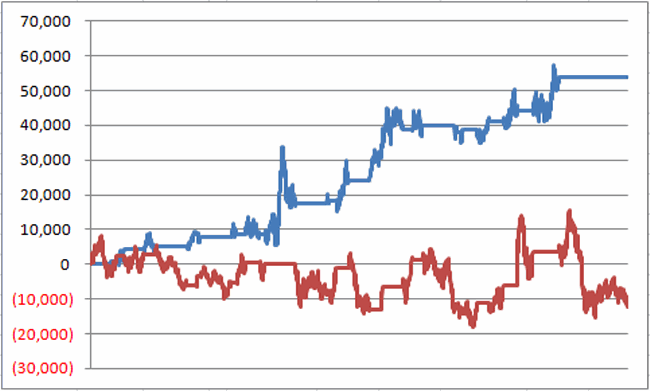
Figure 3 displays the cumulative percent gain or loss for both the FourNonCorr Portfolio and ticker SPY.3Figure 3 – Cumulative % gain/loss for The FourNonCorr Portfolio (blue) versus SPY (red); 12/31/2007-9/30/2017
Year-by-year results appear in Figure 4
4 NonCorr SPY Diff
2008 (6.0) (37.0) 31.0
2009 26.1 26.4 (0.3)
2010 45.2 14.9 30.3
2011 (1.3) 2.1 (3.4)
2012 34.3 15.8 18.5
2013 19.3 32.2 (12.9)
2014 5.3 13.5 (8.2)
2015 0.6 1.3 (0.8)
2016 21.0 11.8 9.2
2017* 24.4 14.1 10.2
Figure 4 – Year-by-Year Results
The results by the numbers appear in Figure 5.
4NonCorr SPY
Average 12mo % +/- 17.8 11.2
Median 12mo % +/- 14.9 15.0
Std. Deviation 17.1 16.8
Ave/Std. Dev. 1.04 0.67
Worst 12mo % (11.9) (43.2)
Max. Drawdown % (17.8) (48.4)
Figure 5 – By the numbers
All told The FourNonCorr Portfolio:
*Gained +334% versus +110% for SPY since 12/31/2007
*Experienced a maximum drawdown of -17.8% versus-48.4% for SPY
Thoughts
On paper, The FourNonCorr Portfolio looks pretty decent, particularly compared to the S&P 500 Index.  But you will recall that I stated earlier that I don’t actually trade this portfolio with real money.  Why not?  A few concerns:
*Interest rates tend to move in long-term waves up and down.  How beneficial will it be to have TLT in the portfolio if and when interest rates embark on a long-term wave up?
*I don’t entirely trust ticker XIV.  Because of the way it is built it seems to have the benefit of upward bias due to contango in the VIX futures market (the opposite of ticker VXX – please Google “VXX” and/or “contango” for an actual explanation) it also holds the potential to sell off in shocking fashion.  Using the index data as I did in order to replicate hypothetical performance from Jan 2008 through Nov 2010, XIV declined a stunning -72% between the end of May 2008 and the end of November 2008. It also experienced a -60% decline in 2015-2016. Need to give some thought to adding a security that is even capable of that to a permanent portfolio.
*On the flip side, XIV has been the driving force for gains in recent years and shows a cumulative gain of +416% since 12/31/2007.  If (and when?) we ever do see a bear market and/or a significant pickup in volatility will XIV have a large negative influence on performance?  That seems to be the $64,000 question.
Summary
As a thought experiment, The FourNonCorr Portfolio shows a pretty decent track record and seems to hold some interesting promise.  As a real money, real world experience – questions remain.
Stay tuned, tinker and experiment if you wish,and don’t be too quick to “dive in.”
Jay Kaeppel Chief Market Analyst at JayOnTheMarkets.com and AIQ TradingExpert Pro client.
Disclaimer:  The data presented herein were obtained from various third-party sources.  Whilne I believe the data to be reliable, no representation is made as to, and no responsibility, warranty or liability is accepted for the accuracy or completeness of such information.  The information, opinions and ideas expressed herein are for informational and educational purposes only and do not constitute and should not be construed as investment advice, an advertisement or offering of investment advisory services, or an offer to sell or a solicitation to buy any security.
System Development Using Artificial Intelligence

The AIQ code based on Domenico D’Errico and Giovanni Trombetta’s article in August 2017 Stock & Commodities issue, “System Development Using Artificial Intelligence,” is shown here. You can also download the EDS file from here

Are humans or computers better at trading? This question has been around on many fronts since the era of punch cards, and as technology advances, you question whether machines have limits. It’s the same with trading, and here’s an algorithm that may shed some light on which performs better…

!ARTIFICAL INTELLIGENCE FOR SYSTEM DEVELOPMENT
!Authors: Domenico D'Errico & Giovanni Trombetta, TASC August 2017
!Coded by: Richard Denning, 6/08/2017
!www.TradersEdgeSystems.com

!INPUTS:
O is [open].
C is [close].
H is [high].
L is [low].
exitBars is 8.
exitBarsP is 6.
enterGap is -0.08.

!CODE:
AvgP is (O+C+H+L)/4.
MedP is (H+L)/2.
MedB is (O+C)/2.

AvgP1 is valresult(AvgP,1).
AvgP2 is valresult(AvgP,2).
AvgP3 is valresult(AvgP,3).

MedP1 is valresult(MedP,1).
MedP2 is valresult(MedP,2).
MedP3 is valresult(MedP,3).
MedP4 is valresult(MedP,4).

MedB1 is valresult(MedB,1).
MedB2 is valresult(MedB,2).
MedB3 is valresult(MedB,3).
MedB4 is valresult(MedB,4).

!ENTRY & EXIT RULESl
Gandalf if 
  (AvgP1exitBars-1)
 or ({position days}>=exitBars-1)
 or ({position days}>=exitBarsP-1 and (C-{position entry price}>0)).

EntryPr is min(val([low],1) + enterGap,[open]).

Buy if Gandalf and [low] <= EntryPr.

See Figure 10 for how to set up the pricing in a backtest.
Sample Chart

FIGURE 10: AIQ. This shows the EDS backtest settings for entry pricing.
—Richard Denning
info@TradersEdgeSystems.com
for AIQ Systems

A Simple Indicator for Traders

First the Bad News: There are no “magic bullets” when it comes to trading.  There are people in this industry who have literally tested somewhere in the range of six bazillion “indicators” – give or take (“Hi. My name is Jay”).  Every trend following indicator looks like a gold mine when it latches onto a huge trend and rides it (but not so much when it starts getting whipsawed).  And every overbought/oversold indicator looks like a gift from heaven from time to time when it somehow manages to peak (or valley) and then reverses right at a high (or low).  And then the next time the thing gets oversold the security in question just keeps plunging and the previously “amazingly accurate” indicator just gets more and more oversold.

Bottom line: what I am about to discuss is likely no better or worse than a lot of other indicators.  And it is no holy grail.  Still, I kinda like it – or whatever that is worth.

EDITORS NOTE an AIQ EDS file for this indicator with the 3 step rules outlined can be downloaded from here you will need to copy or save this file into your wintes32/eds strategies folder. Alternatively the code is available at the end of this article for copying and pasting into a new EDS file.

UpDays20

I call this indicator UpDays20 and I stole, er, learned it originally from Tom McClellan of McLellan Financial Publications.  My calculation may be slightly different because I wanted an indicator that can go both positive and negative.  For a given security look at its trading gains and losses over the latest 20 trading days.

UPDays20 = (Total # of Up days over the last 20 trading days) – 10

So if 10 of the last 20 trading days showed a gain then UpDays20 would read exactly 0.

If only 6 of the last 20 trading days showed a gain then UpDays20 would read -4

You get the idea (and proving once again that it “doesn’t have to be rocket science”).  As a “trading method” it is always advised that this indicator – like most all other indicators – NOT be used as a standalone approach to trading.  That being said, the way I follow this indicator is as follows.

Step 1) UpDays20 drops to at least -2

Step 2) UpDays20 rises 2 points from a low

Step 3) The security in question then rises above its high for the previous 2 trading days

It is preferable to follow this setup hen the security in question is above its 200-day moving average, but that is up to the trader to decide (the danger to using this with a security below its 200-day moving average is that it might just be in the middle of a freefall.  The upside is that counter trend rallies can be fast and furious – even if sometimes short-lived).

Again, there is nothing magic about these particular steps.  They are simply designed to do the following:

1) Identify an oversold condition

2) Wait for some of the selling pressure to abate

3) Wait for the security to show some sign of reversing to the upside

Like just about every other indicator/method, sometimes it is uncannily accurate and sometimes it is embarrassingly wrong (hence the reason experienced traders understand that capital allocation and risk management are far more important than the actually method you use to enter trades).

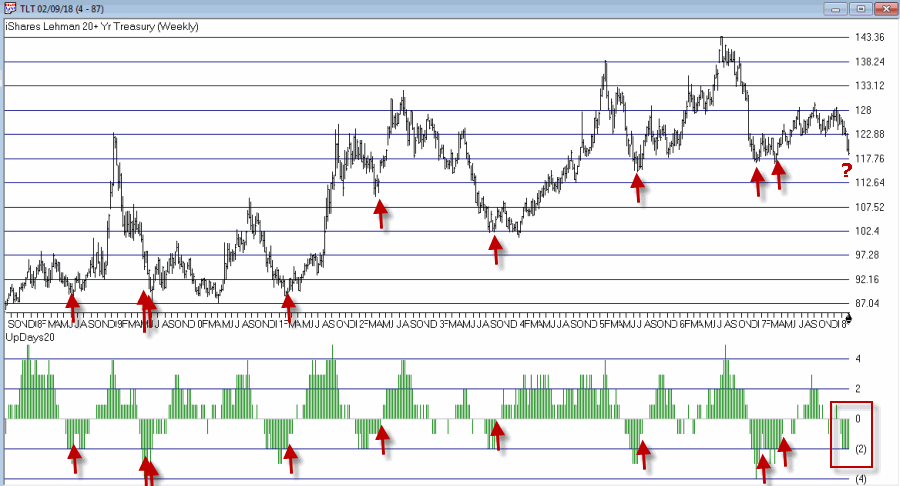
In this previous article (in Figures 3 and 4) I wrote about using this indicator with ticker TLT.  Figure 1 and 2 display the “buy” signals generated using the rules above for tickers IYT and GLD.

1Figure 1 – UpDays20 “Buy” Alerts for ticker IYT (Courtesy AIQ TradingExpert)

2Figure 2 – UpDays20 “Buy” Alerts for ticker GLD (Courtesy AIQ TradingExpert)

Are these signals good or bad?  That is in the eye of the beholder and not for me to say.  One big unanswered question is “when do you exit”?  That is beyond the scope of this “idea” article – however, “sell some at the first good profit and then use a trailing stop” looks like a decent approach to consider) but would have a profound effect on any actual trading results.

Some of the signals displayed in Figures 1 and 2 are obviously great, others are maybe not so hot.  Interestingly, some of the signals in Figure 1 and 2 that don’t look to timely at first blush actually offered a profitable opportunity to a trader who was inclined to take a quick profit. Again, how you allocate capital and when you exit with a profit and when you exit with a loss would likely have as much impact on results as the raw “buy” signals themselves.

Summary

No one should go out and start trying to trade tomorrow based on UpDays20.  No claim is being made that the steps detailed herein will result in profits nor even that this is a good way to trade.

But, hey, it’s one way.

Jay Kaeppel Chief Market Analyst at JayOnTheMarkets.com and AIQ TradingExpert Pro client.

Disclaimer:  The data presented herein were obtained from various third-party sources.  While I believe the data to be reliable, no representation is made as to, and no responsibility, warranty or liability is accepted for the accuracy or completeness of such information.  The information, opinions and ideas expressed herein are for informational and educational purposes only and do not constitute and should not be construed as investment advice, an advertisement or offering of investment advisory services, or an offer to sell or a solicitation to buy any security.
EDITORS NOTE an AIQ EDS file for this indicator with the 3 step rules outlined can be downloaded from here you will need to copy or save this file into your wintes32/eds strategies folder. Alternatively the code is available at the end of this article for copying and pasting into a new EDS file.

! UpDays20 – I call this indicator UpDays20. For a given security look at its trading gains and losses over the latest 20 trading days.

! UPDays20 = (Total # of Up days over the last 20 trading days) – 10

! So if 10 of the last 20 trading days showed a gain then UpDays20 would read exactly 0.

! If only 6 of the last 20 trading days showed a gain then UpDays20 would read -4

Upday if [close]&gt;val([close],1).

totalupdayslast20days is CountOf(upday,20).

updayindicator is totalupdayslast20days – 10.

! How to follow this indicator

! Step 1) UpDays20 drops to at least -2

! Step 2) UpDays20 rises 2 points from a low

! Step 3) The security in question then rises above its high for the previous 2 trading days

UpDays20rises2points if updayindicator&gt;valresult(updayindicator,1) and valresult(updayindicator,1)&gt;valresult(updayindicator,2).

updays20atminus2orlower if valresult(updayindicator,2)&lt;=-2.

closesabovehighof2priordays if [close]&gt;val([high],1) and [close]&gt;val([high],2).

Upsignal if UpDays20rises2points and updays20atminus2orlower and closesabovehighof2priordays.

The Gathering Storm

First the Good News:
*The market averages are still in an up trend
*The Fed has yet to “remove the punch bowl”
1
Figure 1 – Major Averages still in Up Trends (Courtesy AIQ TradingExpert)
Fed Balance Sheet
Figure 2 – Fed Quantitative Easing propels the stock market (Courtesy RealInvestmentAdvice.com)
Now the bad news
Market Bellwethers Flashing Warnings
In this article I wrote about four tickers I follow for signs of early warnings of trouble.  At the moment, all four are flashing warnings.
bellwether 4
Figure 3 – Bellwethers flashing potential warnings (Courtesy AIQ TradingExpert)
Stocks are Extremely Overvalued
Something important to note: valuation indicators are NOT good timing indicators.  The overall market can be over or undervalued for years. However, overvalued valuation readings are extremely reliable at telling us what will come next once the top is in (whenever that may be).  Figure 4 displays the Schiller CAPE model which measures adjusted P/E ratio.schiller cape w datesFigure 4 – Schiller Adjusted PE (Courtesy: Schiller Data Library)
1901: Dow -37% in 32 months
1929: Dow -89% in 3 years
1932: Dow -49% in 13 months
1965: Dow sideways to 40% lower for 17 years
2000: Nasdaq 100 -87%
2007: Dow -55% in 17 months
2017: ??
When will the exact top form?  Don’t know
What will likely follow?  Don’t Ask
The Decennial Pattern
As I wrote about here and as you can see in Figures 5 and 6, the Year 7 into Year 8 period has historically witnesses significant market weakness.  That does not mean that that is what will happen this time around.  But it is reason for caution.
decennial
Figure 5 – Stock Market Decennial Pattern (Courtesy: OptionStrategist.com)
Year 7 2
Figure 6 – Trouble in Late Year “7”  (Courtesy: OptionStrategist.com)
Figure 7 from Tom McLellan illustrates this phenomenon even more clearly.
Year 7 3
Figure 7 – Trouble in Late Year “7”  (Courtesy: www.mclellanoscillator.com)
September
What a crummy time for September to roll around.  Figure 8 displays the fact that the Dow has lost -80% during the month of September since 1897.sep
Figure 8 – Dow has lost -80% during September since 1897
Figure 9 displays the fact that since 1955 most of the “September Nasty” has occurred in that last 10 trading days of the month (after the close on 9/15 this year)
sep x
Figure 9 – Dow in September; 1st 3 days (blue); Last 10 days (green); in between (red); 1955-2016
Investor Complacency
Despite the fact that:
*We have experienced one of the longest bull markets in history
*Stock prices are extremely overvalued on an objective historical basis
*A number of warning signs are flashing
The investment world seems relatively untroubled (in the interest of full disclosure I have done only limited selling so far myself – more on this in a moment).
Figure 10 displays the AAII investor cash allocation reading from earlier this year.   Low cash levels tend to signal complacency (and impending market trouble) while high cash levels tend to occur near market bottoms.
AAII Cash
Figure 10 – AAII Investor Cash % is low (Courtesy: American Association of Individual Investors)
Figure 11 displays the amount of assets in the Rydex suite of “bearish” funds from earlier this year.  As you can see, investors were not too concerned about the prospects for a bear market – a potential contrarian signal.
rydex bear assets
Figure 11 – Rydex Bearish Funds Assets low (Courtesy: The Lyons Share)
Figure 12 shows the level of margin debt versus stock prices.  Historically when margin debt peaks and begins to decline the stock market suffers significantly.  There is no way to predict  when margin debt will top out and roll over but it did recently reach a new all-time high.  Could it go higher? Absolutely.  But if it rolls over – then look out below.
margin debt x
Figure 12 – If Margin Debt peaks trouble may follow (Courtesy: dshort.com)
Figure 13 displays the stock market versus the number of “Hindenburg Omens” (a measure of “churning” in the stock market) that have occurred in the most recent 6-month period.  Another warning sign is flashing.
Hindenburg Omen 6
Figure 13 – Hindenburg Omen flashing a warning (Courtesy: SentimentTrader.com)
Summary
Does any of the above guarantee that a significant stock market decline is imminent?  The correct answer is “No.”  The major market indexes all remain above their long-term moving averages. This can be considered the very definition of a bull market.
I personally have seen lots of warning signs flash along the way over the years.  And I have found that it is important to pay attention to these and to “prepare for the worst” – i.e., to plan an exit/hedging strategy “just in case.”  But trying to pick the exact top is an excellent way to end up looking stupid.  Trust me on this one.
So here is my summary:
*I do not possess the ability to “call the top” nor to “predict what will happen next” in the stock market
*I do possess a reasonably good ability to identify the trend “right now”
*I also possess the ability to recognize gathering storms clouds (and, yes, they are forming) and the ability to formulate an “emergency plan” as well as the wherewithal to follow the plan “should this be an actual (market) emergency.”
The current level of market valuation – and the history of the stock market following previous similar such readings – suggests that the next bear market will surprise many investors by its severity.
The clouds are gathering.  Please plan accordingly.
Jay Kaeppel Chief Market Analyst at JayOnTheMarkets.com and AIQ TradingExpert Pro client. 
Disclaimer:  The data presented herein were obtained from various third-party sources.  While I believe the data to be reliable, no representation is made as to, and no responsibility, warranty or liability is accepted for the accuracy or completeness of such information.  The information, opinions and ideas expressed herein are for informational and educational purposes only and do not constitute and should not be construed as investment advice, an advertisement or offering of investment advisory services, or an offer to sell or a solicitation to buy any security.