Order Confirmed
Thank You for Adding Intraday Snapshot
You're subscribed to AIQ TradingExpert Pro Intraday Snapshot — delayed intraday pricing on every US stock, delivered straight into your end-of-day charts.
What Happens Next
✓ Your credentials will be updated within 24–48 hours with access to this service. No action is needed on your part — once activated, Snapshot data flows through your existing Dial/Data download.
How Often Is the Intraday Snapshot Updated?
During market hours a snapshot of pricing is taken and made available with a 35–40 minute delay. All US stocks are included. You can download several times during a trading day and receive the most recent delayed snapshot directly into your end-of-day Charts — and update AIQ Groups/Sectors, AIQ Reports, AIQ Portfolio Manager, and AIQ EDS strategies right along with it.
Power move: download in the last hour of trading. With the vast majority of the day's data in hand, you can run your full end-of-day analysis and place trades before the market closes.
How It Works With Dial/Data
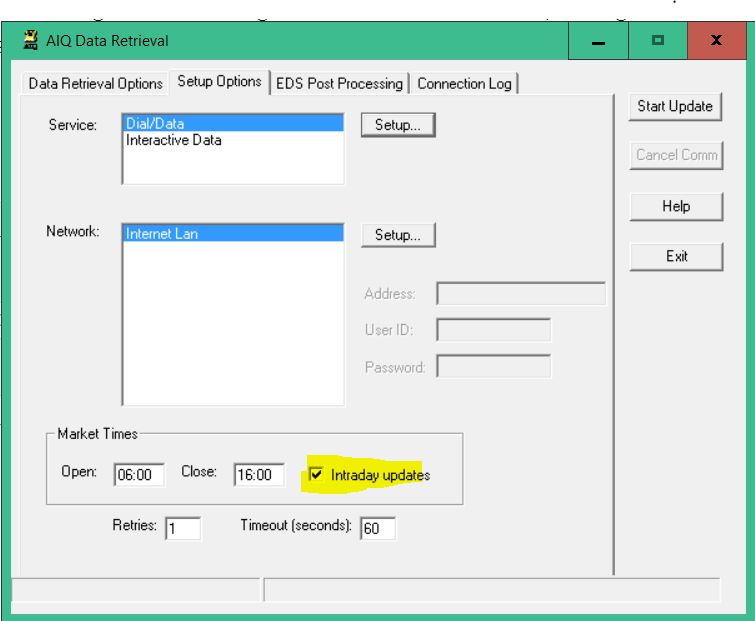
With Intraday Snapshot added to your Dial/Data service, delayed data on all US stocks is automatically downloaded and appended to your end-of-day data files during market hours. The system uses the market hours shown below to determine when a download counts as intraday. Downloading outside market hours ensures the day's closing prices overwrite the intraday snapshot — removing the checkmark is not required to get closing prices.
Thank you for subscribing to AIQ TradingExpert Pro Intraday Snapshot
Your credentials will be updated in 24 - 48 hours with your access to this service.
How often is the Intraday Snapshot data updated?
During market hours a snapshot of pricing is taken and available with 35-40 minute delay. All US stocks are available. You can download several times during a trading day and receive the most recent delayed data snapshot into end of day Charts. You can also update the AIQ Groups/Sectors, AIQ Reports, AIQ Portfolio Manager and AIQ EDS strategies.
The Intraday Snapshot is particularly useful when downloading in last hour of trading as you have an opportunity to undertake end of day analysis with the vast majority of the days trading data and place trades before the market closes.
If you added the Intraday Snapshot to your Dial/Data service, you will automatically get this delayed data on all US stocks downloaded and appended to your end of day data files during market hours. The system uses the market hours below to determine when a download is considered intraday. Downloading outside the market hours ensures the closing prices for a day overwrite the intraday. Removing the checkmark is not required to get closing prices.
