How to Read, Confirm, and Trade the Signals

AIQ’s Market Timing Expert Ratings compress hundreds of technical conditions into a single, actionable score. Use 95+ up or down ratings as “of-notice” events, then confirm direction with the Price Phase indicator before acting. This simple two-step process keeps you aligned with the dominant swing while filtering many head fakes.

What the Market Timing Expert Rating Really Is

Under the hood, the AIQ Expert System evaluates ~400+ indicator states through an inference engine (decision-tree style) and outputs a daily market rating—from neutral to powerful up/down signals. You’ll also see these ratings plotted directly on historical charts in TradingExpert Pro.

Why that matters: Instead of juggling dozens of internals, you get a unified, explainable read of market conditions that has been kept methodologically stable for years (no goal-post shifting or perpetual re-optimization). That stability helps make the historical behavior of the signals more comparable across cycles.

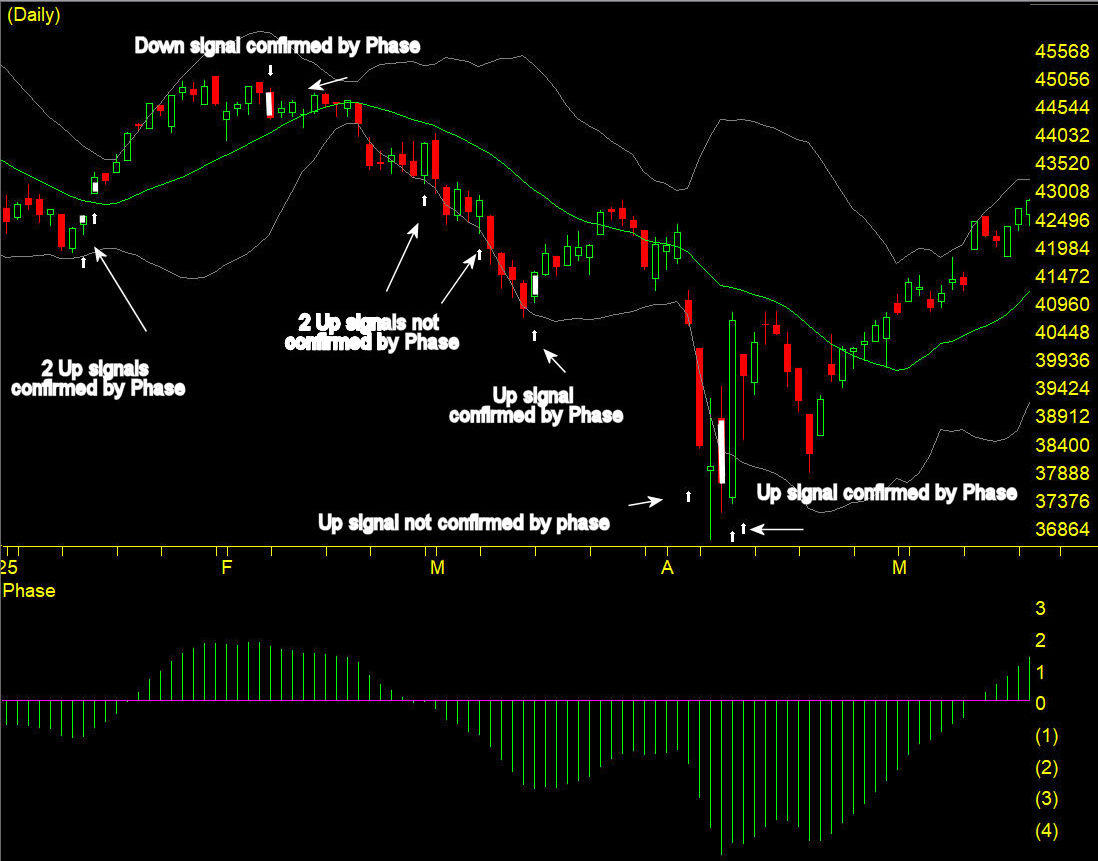
AIQ Market Timing signals with confirmation by Phase Jan – May 2025

The Confirmation Key: AIQ’s Price Phase Indicator

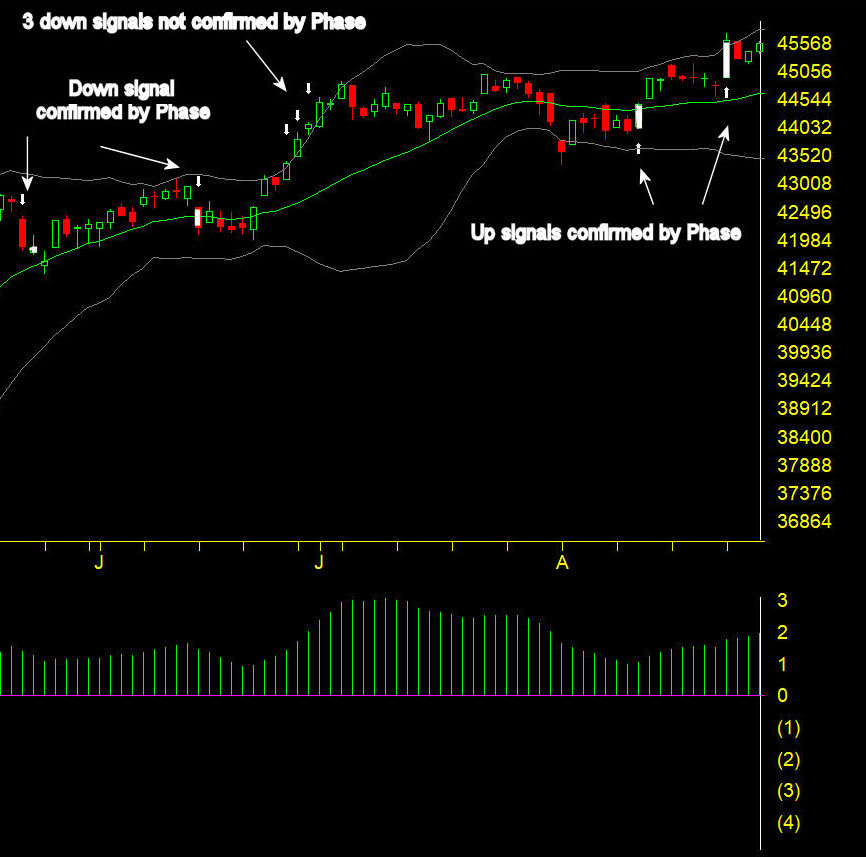
AIQ explicitly recommends using the Price Phase Indicator (“Phase”) as the primary filter for Expert Ratings. When Phase direction agrees with a high Expert Rating signal, the signal is considered confirmed. In other words:

  • Strong Up Rating (≥95) → look for Phase turning up or already rising to confirm.
  • Strong Down Rating (≥95) → look for Phase turning down or already falling to confirm.

This is purposeful: Expert Ratings often fire early—giving you a heads-up—while Phase helps you avoid acting too soon. Think of Ratings as the alert and Phase as the green light.

Interpreting the Score: When Does “High” Mean “Actionable”?

Per AIQ’s guidance, 95 or greater to the upside or downside is the zone “of notice.” That’s when you should lean in, check Phase, and consider entries/exits or hedges—not when readings are middling or neutral. Most days are neutral; the edge lives in waiting for 95+ and confirming with Phase.

AIQ Market Timing signals with confirmation by Phase May – Aug 2025

Where to See It in TradingExpert Pro
  • On your AIQ Main Menu, select Market Charts, and plot Price Phase in a lower pane. This combination is designed for side-by-side evaluation.
  • If you prefer a visual “state” view, Heikin-Ashi-mode bars with Phase underneath are often used in AIQ’s examples to highlight trend persistence.
How to Read the 2025 Chart (Step-by-Step Playbook)
  1. Spot the Spike
    Scan for 95+ up/down ratings. Put a small flag on each to review.
  2. Check Phase Direction
    • If the rating is Up (≥95), is Phase rising or just turned up?
    • If Down (≥95), is Phase falling or just turned down?
      Match = Confirmation. No match? Put it on watch—often the earliest ratings need a bar or two before Phase confirms.
  3. Plan Entries/Exits
    • For confirmed Up: consider scaling into risk-defined long exposure, tightening shorts.
    • For confirmed Down: consider trimming longs, or tactical shorts—again, with risk clearly defined.
  4. Manage the Hold
    Historical AIQ studies often show swing-length holds rather than ultra-short scalps (average holds are one week to several weeks), but your trade horizon should match your strategy.
Best Practices (That Save You from Heartache)
  • Don’t front-run Phase on big ratings. Early feels clever until it doesn’t. Let the filter do its job.
  • Treat 95 as your attention alarm. Below that, conserve focus; above that, prepare plans.
  • Neutral = No edge. Most days are noise; your edge is in selectivity.
Common Questions

Q: Are the rules curve-fit over time?
A: AIQ deliberately keeps the rating calculation stable, avoiding constant re-tuning. That consistency is part of why the historical behavior is analyzable.

Q: Is Phase the only valid confirmation?
A: It’s AIQ’s primary confirmation tool for Expert Ratings and the one used in the official “confirmed” flagging. You can add your own overlays, but Phase remains the recommended filter.

Q: Do signals work on intraday charts?
A: The Market Timing ratings are generated daily. You can time entries intraday after a daily confirmation, but the signal itself is evaluated on the daily close framework.

Final Word

AIQ’s Market Timing Expert Ratings give you clean, explainable signals—and the Price Phase indicator gives you the discipline to act only when odds tilt in your favor. Use the 95+ threshold to focus, Phase to confirm, and your risk plan to stay in the game when it counts.

The World Leader in Intelligent Trading Software

"Best Artificial Intelligence Trading Software" - 1st Runner Up 2025

Finalist 2024 Semi-Finalist 2023, 2022 & 2021

Readers Choice Awards, Stocks & Commodities magazine 

Tune into a special edition of NewsWare's Trade Talk

With Trading Anchor Bill Olsen and Steve Hill, CEO of AIQ Systems.

Our experts offer sector-based insights and analysis on what happened in Q1 and what to look ahead for in Q2.

AI-based Signals Uncover Hidden Trades

Award-winning AI-based expert system screens for trading candidates that may have been missed by other systems, giving you an edge.

Zero-in on the Top Industry Sectors 

Our built-in group and sector analysis reports analyze every industry group and sector daily to keep you informed of leading and lagging issues.

Time Saving Analysis with Chart Barometer

Our Indicator Barometer gives you an instant evaluation of the status of all indicators for each chart. Saving you time and providing an easy-to-read analysis of any ticker.

Every Chart your way with Custom Layouts 

"The indicators you want, displayed the way you want. Click through dozens of charts in seconds."

Whether you prefer price bar, candlestick, or point and figure charts, we’ve got them. Plus, TradingExpert Pro delivers all the trendline and drawing tools that you expect in a top end package, including Fibonacci Studies, Gann Fans, and Regression Lines.

Charting features found only in TradingExpert Pro

  • Quick Switch Control Panel — The feature that truly sets AIQ’s charting apart. At the touch of a key, switch from the Indicator Panel to a List Panel to easily chart securities from your favorite lists.
  • Indicator Barometer gives you an instant evaluation of the status of all indicators for each chart.
  • Explore feature allows fast and fluid searching of multi-level lists and industry group structures. At any level you can step up, down, or sideways and quickly view charts on an entire list of issues.
  • Tag List tool allows you to add a symbol to a watch list or create a new list while viewing charts. “Superb” say traders.
  • One-of-a-kind indicators based on AIQ’s expert system technology provide tools that our traders learn to rely on for market direction and group and sector rotation.
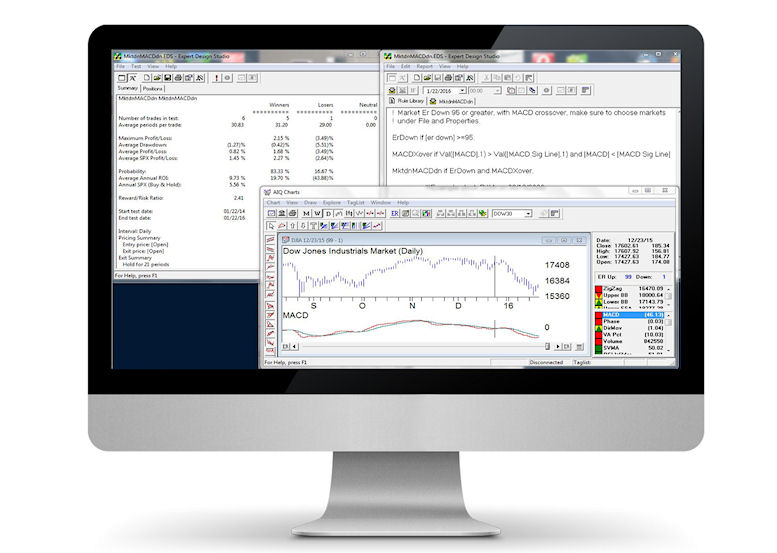
  • Build custom indicators by simply describing them to AIQ’s Expert Design Studio and adding them to the Indicator Library. 

Time Saving Power - 200 Screening Reports

TradingExpert Pro automatically performs millions of computations and delivers instant access to one and two-page reports highlighting trading candidates for stocks, indexes, mutual funds, groups and sectors and more.....

Want to find tickers in a trend? We got it. Relative strength? Volume Spikes, Persistence of Money Flow, Price Gap, Point and Figure Breakouts and many many more.

Complete Array of Analysis Tools

TradingExpert Pro's Proven Market Timing "too good to ignore.” Called the Crash of ‘87 and has called all major market moves since. Its multi-indicator, rule-based approach for determining market direction is time proven.  Plus:

  • Professional Level Portfolio Management
  • Matchmaking Correlation tools
  • Automate Your Winning Systems
  • Portfolio Simulation Tools

Seasonality Charts - Favorable Trading Periods

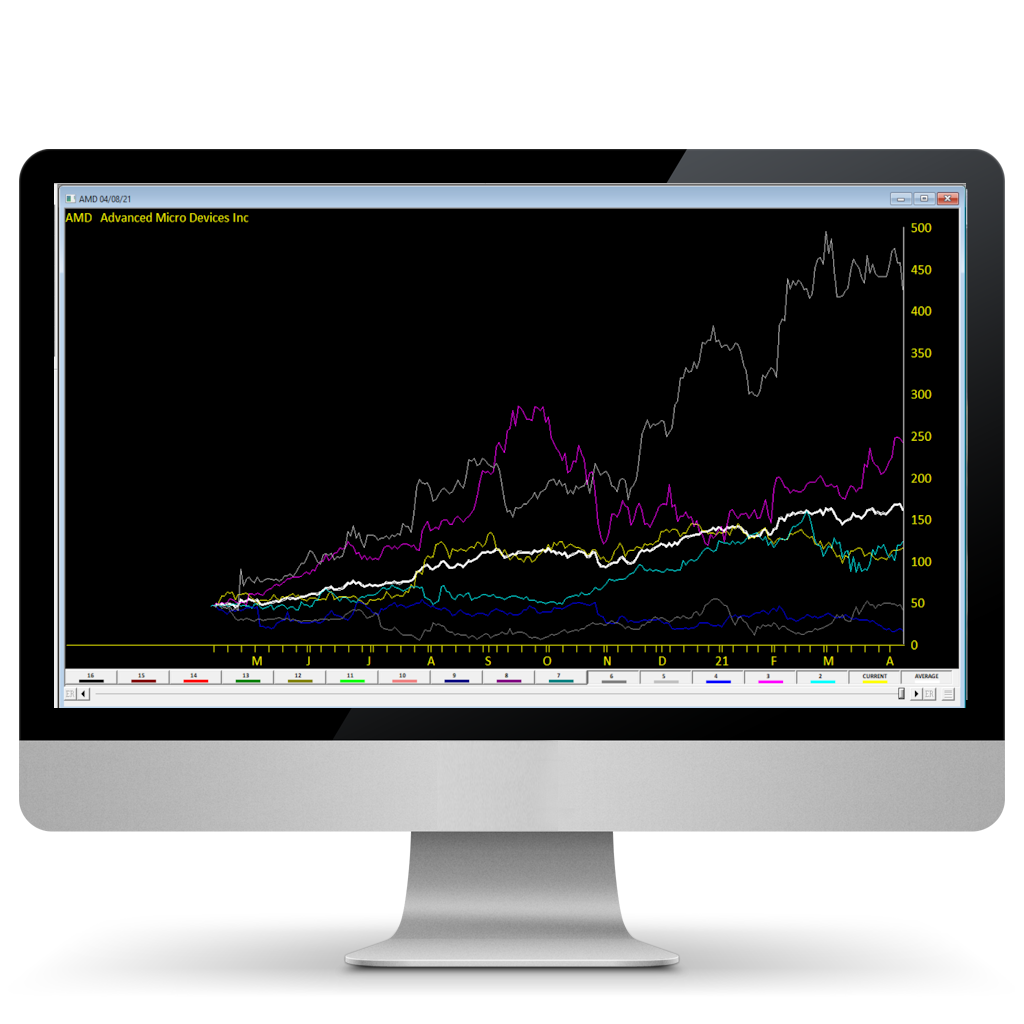
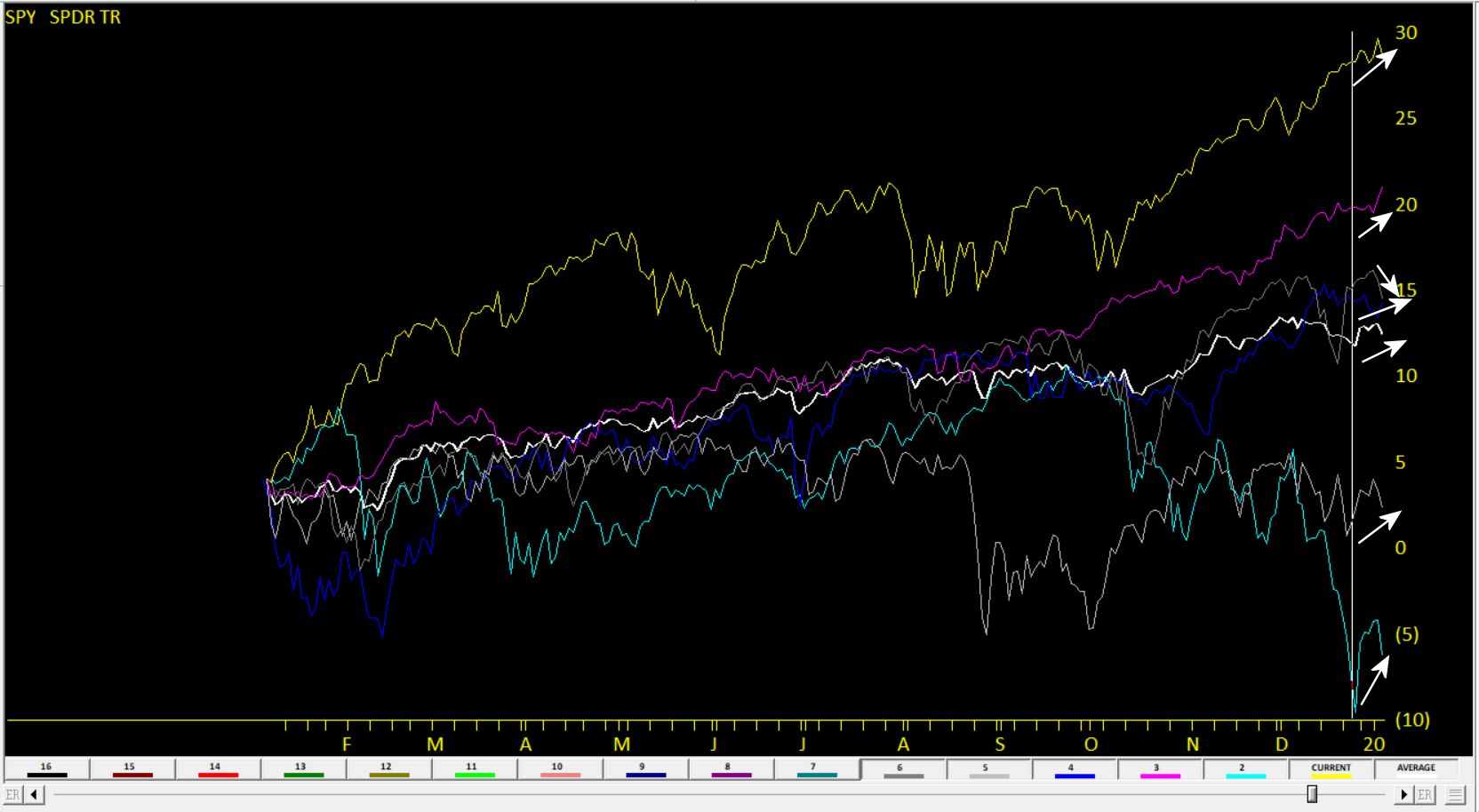
TradingExpert Pro provides a Seasonal Chart adding  10+ years of price change on one chart with an average line. Pinpoint times of the year when a ticker frequently trades the same way. Change the date back in time to focus in on seasonal patterns.

Chart Indices like the Dow 30 and look back at December period for 10 years to see if the Santa Claus rally works. 

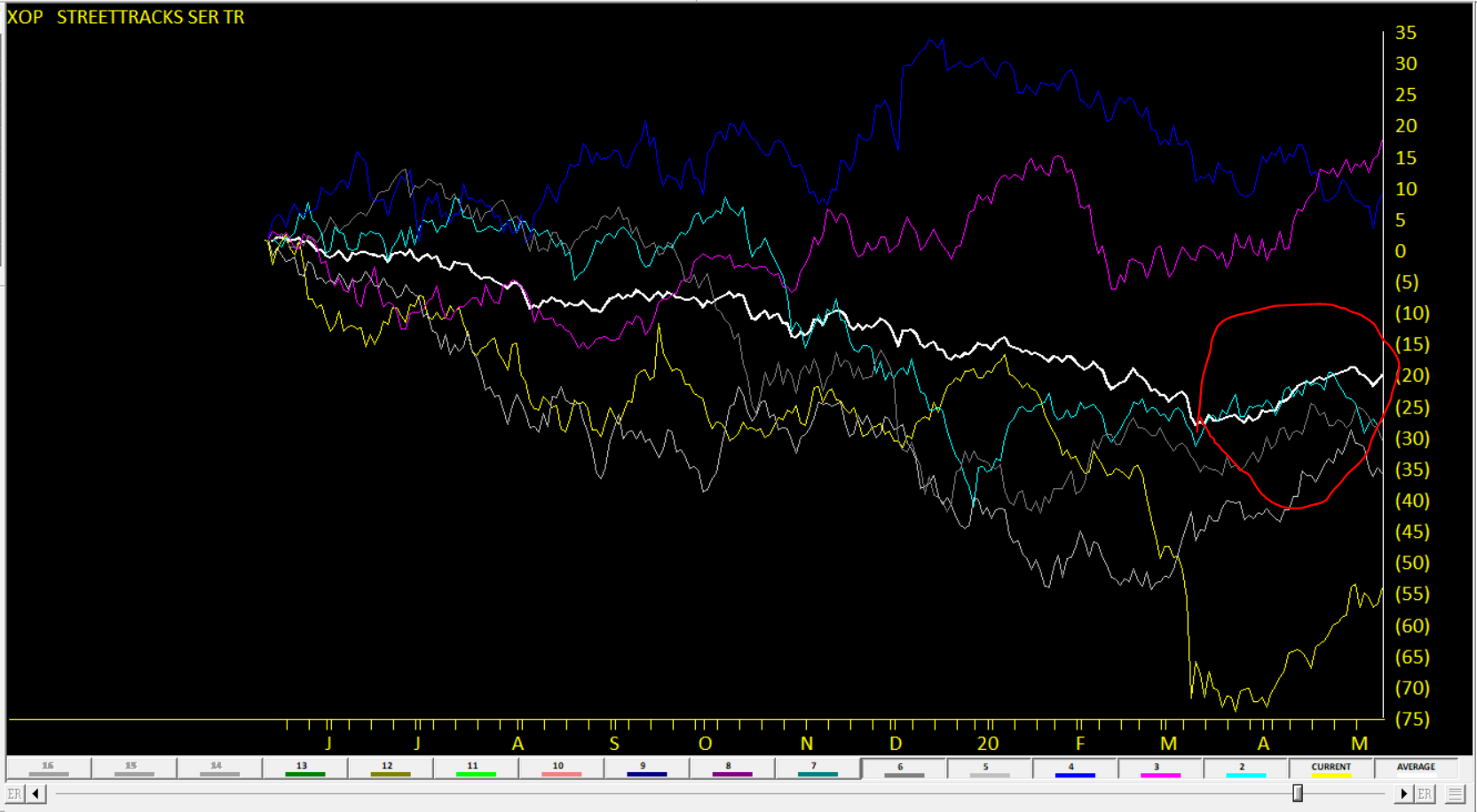
Check out the Energy Sector Seasonality, seasonal strength from January 21st through to May 9th, related to the refiner transition period.

Building a Trading System - Just got a Whole lot Easier

TradingExpert Pro provides an amazing way to design, test, and automate virtually any trading ideanand is considered by traders to be the best tool of its kind. It combines a point-and-click interactive trading library with state of the art back testing and custom screening reports.

PLUS our Pre-built strategies have been fine-tuned by our analysts to produce outstanding results. 

  • All the tools
  • All the data in one package
  • All one price
  • Month to month service.
  • No annual contract
  • No upfront software purchase

"Over 25 years serving individual and professional traders and investors"

Everything you need to make investment decisions without hours of research, all in TradingExpert Pro

Try out the TradingExpert Pro platform for 30-days 

OR CALL AIQ SALES on 1-800-332-2999 or 775-832-2798

Monthly plans for software and data start at $101/mo.   LEARN MORE

System Requirements: Windows 10 or higher